Screenshot Magic allows image capture from the following sources: Full Desktop, Active Window (full or contents only) and DirectX Fullscreen (games). Screenshot Magic can save images in the following formats (24-bit): BMP, JPG and PNG.
The most practical desktop tool for capturing selected area from the screen. Allows to save (supports *.PNG, *.JPG, *.GIF), upload to server (gives short URL), edit screenshot with online picture editor, share screenshot via Twitter, Facebook, Digg.
How to take a screenshot or record screencast and share in one click? You don't have to use complicated programs, just run this simple application to capture a screen picture or even video with single click and share it with friends. Simple as 1-2-3.
Take a screenshot and share it with your friends Just click "Screenshot" (or press F9), select an area and now you have the URL in your clipboard. Everyone who receives the link will be able to see your screenshot.
The most practical desktop tool for capturing selected area from the screen. Allows to save (supports *.PNG, *.JPG, *.GIF), upload to server (gives short URL), edit screenshot with online picture editor, share screenshot via Twitter, Facebook, Digg.
Fastscreen - a simple but powerful program for taking screenshots of your desktop. You can make a screenshot of the screen, active window or entire desktop. You can edit the screenshot, and upload it to a server or send by e-mail.
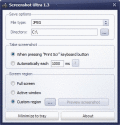
Screenshot Ultra is a free application that will help you to capture and save the content of your screen. Once you choose your image type and destination you are able to take screenshots manually or set it to automatic mode.
 HandyArchive