 HandyArchive
Easy-to-use RAM optimizer tool.
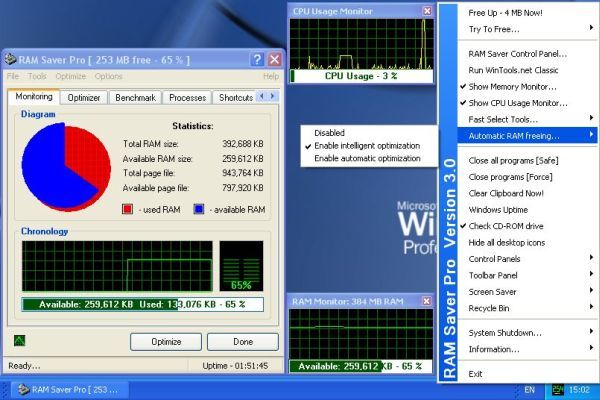
RAM Saver Pro 18.3
Easy-to-use RAM optimizer tool that will keep your computer running faster. It increases the operation system performance by making more memory available for your applications.
RAM Saver Pro will:
- defragment system memory for faster access time;
- increasing the efficiency of your CPU and Motherboard caches;
- recover memory leaks from poorly behaved applications;
- temporarily flush unused libraries out to disk and so on.
Using these optimization tricks will help your favorite applications and games run faster and more efficiently - even on old computers.
Main program features:
- System Tray monitor;
- Desktop RAM monitor;
- Desktop CPU Usage monitor;
- specialized Control Panel;
- professional memory monitoring;
- flexible memory optimization with complete statistics output;
- RAM benchmark test;
- monitoring and control over the processes which take place in the memory;
- possibility to create boosted shortcuts;
- common and advanced options;
- automatic and intelligent optimization;
- fast run of tools;
- forced cleaning of Clipboard;
- possibility to close all programs for full memory release by one click;
- control over Windows uptime;
- suppressing and fast running of screen savers;
- check the presence of disk in CD-ROM drive in the moment of computer shut down;
- manipulating with desktop icons;
- forced shut down and restart of computer;
- fast access to Control Panels;
...
RAM Saver Pro will:
- defragment system memory for faster access time;
- increasing the efficiency of your CPU and Motherboard caches;
- recover memory leaks from poorly behaved applications;
- temporarily flush unused libraries out to disk and so on.
Using these optimization tricks will help your favorite applications and games run faster and more efficiently - even on old computers.
Main program features:
- System Tray monitor;
- Desktop RAM monitor;
- Desktop CPU Usage monitor;
- specialized Control Panel;
- professional memory monitoring;
- flexible memory optimization with complete statistics output;
- RAM benchmark test;
- monitoring and control over the processes which take place in the memory;
- possibility to create boosted shortcuts;
- common and advanced options;
- automatic and intelligent optimization;
- fast run of tools;
- forced cleaning of Clipboard;
- possibility to close all programs for full memory release by one click;
- control over Windows uptime;
- suppressing and fast running of screen savers;
- check the presence of disk in CD-ROM drive in the moment of computer shut down;
- manipulating with desktop icons;
- forced shut down and restart of computer;
- fast access to Control Panels;
...
Keywords:
wintools, registry, windows, files, scan, clean, clear, extramame, extrasubst, ramsaver, fileencryptor, uninstaller, scan files, scan registry, startup, optimizer, tweaker, xp, vista, 7, 2000, win, utility, tools, utilities