 HandyArchive
Copy and Save any area of screen instantly
Take Screenshot 1.0
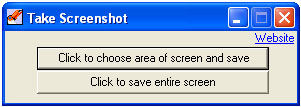
Take Screenshot is an instant screenshot taker program which can copy and save any or all area of screen instantly to a jpg file. It is extremely easy to use and is designed to make windows screenshot taking process a lot faster.
To take a screenshot you need to follow simple steps -
- Select between choose area or entire screen.
- If selected choose area, your screen will turn into an image whose area can be selected.
- Once area is selected, a save dialog will open.
- Name the output image and save.
- If entire screen was chosen then save dialog will open directly.
So if you want to copy any area of your computer screen to a file, simply download Take Screenshot
To take a screenshot you need to follow simple steps -
- Select between choose area or entire screen.
- If selected choose area, your screen will turn into an image whose area can be selected.
- Once area is selected, a save dialog will open.
- Name the output image and save.
- If entire screen was chosen then save dialog will open directly.
So if you want to copy any area of your computer screen to a file, simply download Take Screenshot