 HandyArchive
NetSpot - WiFi Analyzer and Site Survey Tool
NetSpot - WiFi Analyzer and Site Survey Tool 2.1.1
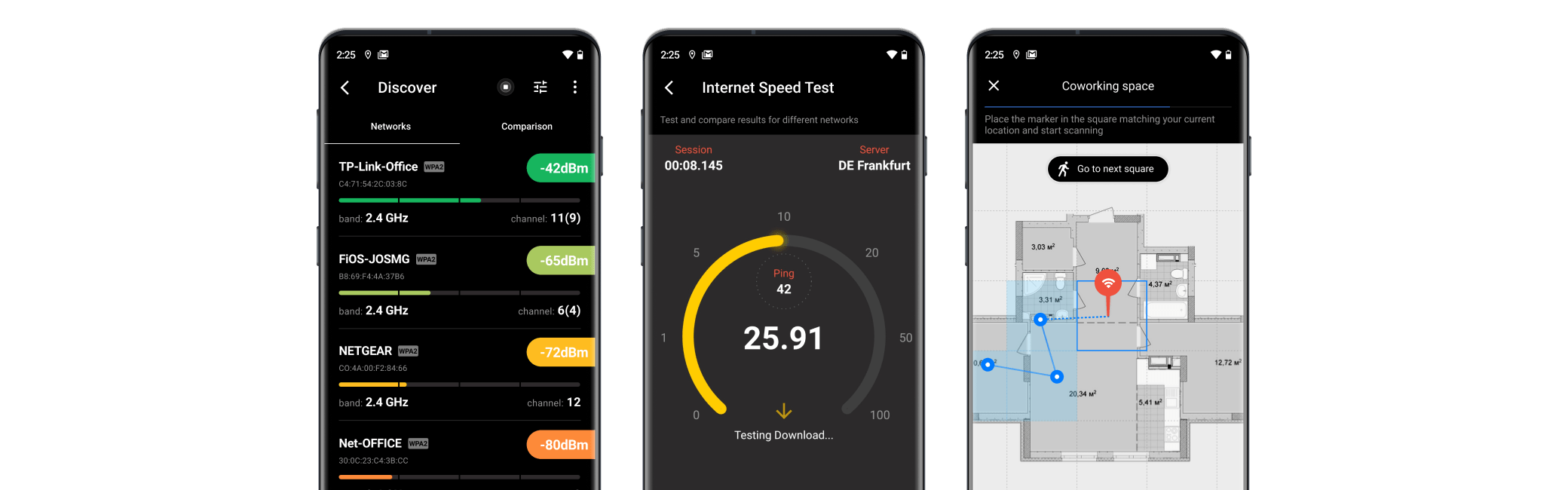
Using NetSpot WiFi analyzer and wireless survey tool is a sure way to create flawless coverage throughout your space. Whether you are perfecting the WiFi coverage of a home or an office, the NetSpot WiFi app for Android can offer the most optimal results. Exceptional simplicity and affordability make NetSpot an all-in-one wireless scanner and WiFi Analyzer and survey app.
You can perform a survey with just your phone or tablet at hand and then generate beautiful heatmaps in NetSpot Home, Pro, or Enterprise on your Windows or Mac computer for a thorough analysis. No special knowledge or hardware is required.
Here's what you can do with NetSpot WiFi Analyzer:
вљЎпёЏ Perform a wireless site survey with NetSpot on your Android device;
вљЎпёЏ Survey a space of any size - from a tiny apartment to a huge warehouse;
вљЎпёЏ Analyze WiFi coverage with comprehensive visualizations in the desktop NetSpot PRO, Home, or Enterprise;
вљЎпёЏ Test the Internet speed for your network.
вљЎпёЏ Scan your and surrounding wireless networks;
вљЎпёЏ Compare networks by Signal strength and WiFi Channel;
NetSpot operates the following data:
вђпёЏ Live Data: NetSpot collects and visualizes 802.11 a/b/g/n/ac/ax live Wi-Fi data
вђпёЏ 2.4 and 5GHz Bands: NetSpot supports 2.4GHz and 5GHz channel bands
вђпёЏ Details on all APs: Network name, MAC address, Channel, Signal level, Security, etc.
Areas, where NetSpot WiFi Analyzer is indispensable:
вњ… Monitoring your wireless network for general issues;
вњ… Detecting and fixing WiFi channel overlap cases;
вњ… A quick examination of the surrounding WiFi coverage;
вњ… Performing an exhaustive wireless site survey;
вњ… Checking for any issues with wireless connection;
вњ… Testing your current network's Internet speed and analyzing it at different periods of time;
вњ… Detecting signal leakages.
Start using NetSpot WiFi analyzer today to prevent any issues with your WiFi in the future!
Feel free to send us your feedback at [email protected] and we'll get back to you as soon as possible.
You can perform a survey with just your phone or tablet at hand and then generate beautiful heatmaps in NetSpot Home, Pro, or Enterprise on your Windows or Mac computer for a thorough analysis. No special knowledge or hardware is required.
Here's what you can do with NetSpot WiFi Analyzer:
вљЎпёЏ Perform a wireless site survey with NetSpot on your Android device;
вљЎпёЏ Survey a space of any size - from a tiny apartment to a huge warehouse;
вљЎпёЏ Analyze WiFi coverage with comprehensive visualizations in the desktop NetSpot PRO, Home, or Enterprise;
вљЎпёЏ Test the Internet speed for your network.
вљЎпёЏ Scan your and surrounding wireless networks;
вљЎпёЏ Compare networks by Signal strength and WiFi Channel;
NetSpot operates the following data:
вђпёЏ Live Data: NetSpot collects and visualizes 802.11 a/b/g/n/ac/ax live Wi-Fi data
вђпёЏ 2.4 and 5GHz Bands: NetSpot supports 2.4GHz and 5GHz channel bands
вђпёЏ Details on all APs: Network name, MAC address, Channel, Signal level, Security, etc.
Areas, where NetSpot WiFi Analyzer is indispensable:
вњ… Monitoring your wireless network for general issues;
вњ… Detecting and fixing WiFi channel overlap cases;
вњ… A quick examination of the surrounding WiFi coverage;
вњ… Performing an exhaustive wireless site survey;
вњ… Checking for any issues with wireless connection;
вњ… Testing your current network's Internet speed and analyzing it at different periods of time;
вњ… Detecting signal leakages.
Start using NetSpot WiFi analyzer today to prevent any issues with your WiFi in the future!
Feel free to send us your feedback at [email protected] and we'll get back to you as soon as possible.