|
|
|
|
|
|
|
Hide windows and process with a simple hotkey
|
BlindBossKey-Pro 1.3.0
Author:
Supported languages: English
Supported OS: Win2000 / Win7 x32 / WinVista / WinXP
Price: $9.50
|
|
|
|
|
|
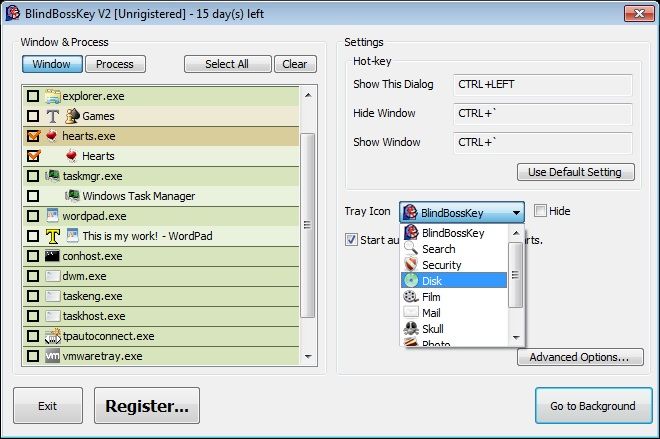
Blind-BossKey will hide and restore the windows (programs) on your screen with the press of a hotkey or a mouse shortcut. It will cover all the tracks of the running programs by hiding them also from the task bar. In addition to that Boss Key will not close the applications but keep them hidden in the background thus preserving your data at the point of interruption. All you need to do when the threat has passed is to hit the bosskey shortcut again to restore your work at the point of interruption.
In addition to all that the application can mute the sound, switch the display resolution (if you were playing a game or watching a movie), start (bring to top if running) an application and many more. Please take a look at the features list for more details.
By hiding windows you have the freedom to protect your privacy and hide sensitive information from prying eyes.
Blind-Bosskey's size is diminished to reduce memory usage without making compromises to the features in order to run without disturbing your usual work. It's speed is brought to maximum to let you react as quickly as possible to any threat that appears. You won't feel even a slight difference in the performance of your home or office computer after installing it.
There are some special features in BlindBossKey-Pro:
1. Hide notify-area(tray-icons) in the windows taskbar while hidding windows.
2. Mute system volume while hidding windows.
3. Lock your computer while hidding windows.
4. Launch default screen-saver while hidding windows.
5. Restore your display resolution to the current setting while hidding windows.
6. Change the tray-icon of BlindBossKey-Pro.
All the features above can be performed at the same time.
|

Free BlindBossKey-Pro download - 438 Kbblindbosskey-pro.exe
|

Buy full version online for just $9.50 |
| Keywords:
boss key, anti boss, bosskey, hide window, hide windows, hide application, hide tray icon, mute volume, launch screensaver, lock computer |
|
|
|
|
|