|
|
|
|
|
|
|
Stamp your photos with watermark in batch.
|
PhotoX Batch Watermark Creator 3.6.3
Author:
Supported languages: English, ChineseSimplified, ChineseTraditional, French, German
Supported OS: Win2000 / WinXP / Win7 x32 / Win7 x64 / Windows 8 / Windows 10 / WinServer / WinOther / Windows2000 / Windows2003 / Wind
Price: $39.50
|
|
|
|
|
|
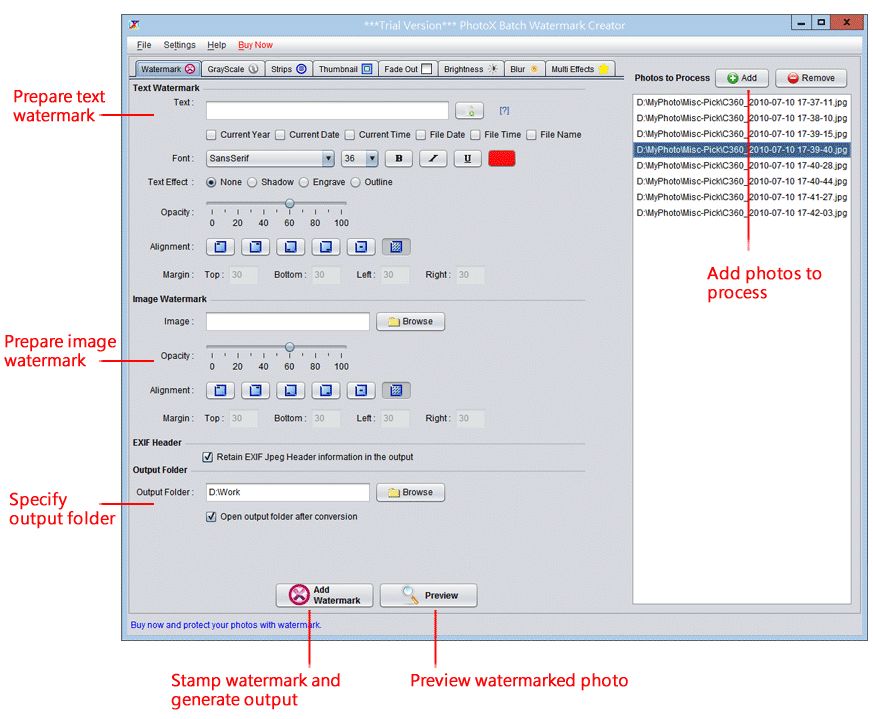
PhotoX software provides a quickest and easiest way to watermark your photo. Avoid unauthorized use of your product photos, stamp your product photos with watermark. You can add text or image watermark. For Text Watermark, you can set different font face, font size, bold, italic or underline with different color. For Image Watermark, you can pick from different formats of image, include gif, jpg, png and others. The watermark can be set into different position of the photo. It can also be aligned diagonally on the photo. You can also adjust the opacity of the watermark to ensure the readability of photo. Besides watermarking, you can make use of other tools to protect your photos. They are Grayscale, Add Strip, Thumbnail and Fade Out effect. With these tools, you can: convert your photos into grayscale; add strips on top of photos; generate thumbnail of photos and apply fade out effect on the photos.
|

Free PhotoX Batch Watermark Creator download - 32 Mbphotox-setup.exe
|
| Keywords:
watermarking photo, batch watermark, copyright photo, photo, copyright, image, protect, infringe, product photo, photo album |
|
|
|
|
|