|
|
|
|
|
|
|
Automatically send out files via e-mail
|
FileInMail 2.4
Author:
Supported languages: English, Arabic, Catalan, Czech, Danish, Dutch, Finnish, French, German, Greek, Hebrew, Hungarian, Icelandic, Irish, Italian, Macedonian, Polish, Portuguese, Romanian, Russian, Serbian, Slovenian, Spanish, Swedish, Turkish, Urdu
Supported OS: WinXP / WinVista / WinVista x64 / Win7 x32 / Win7 x64 / Win2000 / Windows2000 / Windows2003 / WinServer / Windows Vist
Price: $33.50
|
|
|
|
|
|
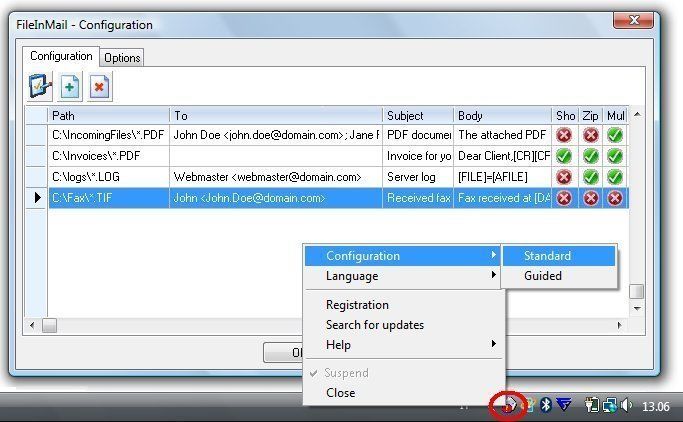
FileInMail automatically monitors one or more directories for specified files. As soon as they appears, the files are archived on disk, eventually compressed as ZIP files, and forwarded via e-mail to one or more recipients through your own e-mail Client program or an SMTP server, with or without user intervention.
FileInMail Key Features:
* Works on any Windows machine, from 98 to Windows 8/10
* Automatically send the files as attachments by using your own e-mail client program (MS-Outlook, Outlook Express, Windows Mail, Mozilla Thunderbird and any other MAPI compatible e-mail client program) and your own e-mail settings, just like you would have sent them manually
* If you prefer, you can even use a SMTP server instead of your own mail client program, even if the server uses authentication and non-standard ports, with or without user intervention
* You can specify multiple directories to monitor
* You can watch for multiple file patterns on each directory
* You can forward the files to multiple recipients in a single e-mail message
* You can specify different custom Subject and Body text for each kind of e-mail
* You can specify them statically, or you can drive FileInMail by an external program that creates a small ascii (INI) file with a dynamic configuration. Even DOS programs and batch files can do it
* Mail can be sent out with or without user intervention
|

Free FileInMail download - 1.34 Mbsetup-fm.exe
|

Buy full version online for just $33.50 |
| Keywords:
File, Mail, monitor directory, automatically email files |
|
|
|
|
|