|
|
|
|
|
|
|
Indexing for Litigation
|
Easy Mark Index 1.0
Author:
Supported languages: English
Supported OS: WinXP / Windows2000 / Windows2003 / Windows Vista Starter / Windows Vista Home Basic / Windows Vista Home Prem
Price: $895.00
|
|
|
|
|
|
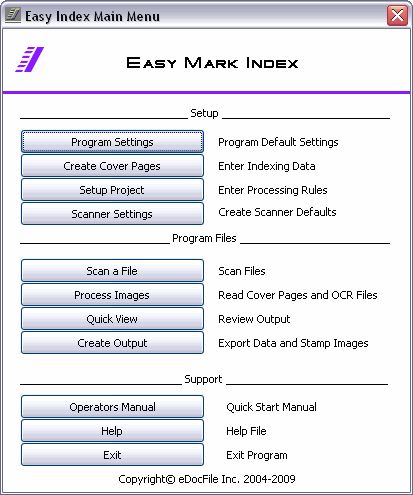
Easy Mark Index is a collection of simple utilities that allow a user to prepare images for use in Litigation Document Management Programs. Its features include the ability:
??? Reading a simple OMR (Optical Mark Read) Form, (commonly called Scantron Sheets or Bubble Forms) to collect index information.
??? Create matching OCR text files to images. The text file can either be a single page text file or multi-page text file.
??? Convert existing multi-page tiff images into single page tiff images with matching text files.
??? Specify a document length and import existing single page tiff files to create multi-page text files that match the document length.
??? Specify how many images should be contained in each output folder with no document being broken between folders.
??? Create a csv file to be read by a Litigation Document Management Programs in the format of:
" file location" ,"start image", "ending image", "starting text file", "ending text file", "Index value1", "Index value2", "Index value3", "Index value4", "Index value5", "Index value6"
or if using multi-page text for output
" file location" ,"start image", "ending image", "text file", "Index value1", "Index value2", "Index value3", "Index value4", "Index value5", "Index value6"
??? Stamp images (Bates Stamp) with a prefix and the file name (less extension) without ever obstructing any part of the image.
??? Quickly view images and change index information before the creation of output.
??? Create an easy to understand table of file and index information that can be modified in a spreadsheet program before the import table is created.
??? It creates an import table as a csv file that contains the location of the image, the starting document file name, the ending document file name (all single page tiff files), either a range of single page text files that match the document, or a multi-page text file
??? The program can also import multi-page Tiff files and process them into single page files with matching OCR text.
|

Free Easy Mark Index download - 32 MbSetup%20Easy%20Mark%20Index.exe
|
| Keywords:
Litigation, Scanning, Summation, Concordance, Conversion |
|
|
|
|
|